Tuples
Tuples
A tuple is a collection of different data types which is ordered and unchangeable (immutable). Tuples are written with round brackets, (). Once a tuple is created, we cannot change its values. We cannot use add, insert, remove methods in a tuple because it is not modifiable (mutable). Unlike list, tuple has few methods. Methods related to tuples:
- tuple(): to create an empty tuple
- count(): to count the number of a specified item in a tuple
- index(): to find the index of a specified item in a tuple
-
- operator: to join two or more tuples and to create a new tuple
Creating a Tuple
- Empty tuple: Creating an empty tuple
py
  # syntax
  empty_tuple = ()
  # or using the tuple constructor
  empty_tuple = tuple()
- Tuple with initial values
py
  # syntax
  tpl = ('item1', 'item2','item3')
py
  fruits = ('banana', 'orange', 'mango', 'lemon')
Tuple length
We use the len() method to get the length of a tuple.
# syntax
tpl = ('item1', 'item2', 'item3')
len(tpl)
Accessing Tuple Items
- Positive Indexing
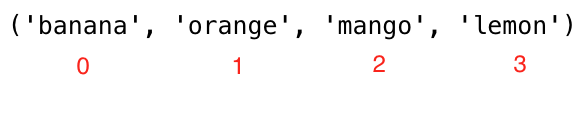
Similar to the list data type we use positive or negative indexing to access tuple items.
py
  # Syntax
  tpl = ('item1', 'item2', 'item3')
  first_item = tpl[0]
  second_item = tpl[1]
py
  fruits = ('banana', 'orange', 'mango', 'lemon')
  first_fruit = fruits[0]
  second_fruit = fruits[1]
  last_index =len(fruits) - 1
  last_fruit = fruits[las_index]
- Negative indexing
Negative indexing means beginning from the end, -1 refers to the last item, -2 refers to the second last and the negative of the list/tuple length refers to the first item.

py
  # Syntax
  tpl = ('item1', 'item2', 'item3','item4')
  first_item = tpl[-4]
  second_item = tpl[-3]
py
  fruits = ('banana', 'orange', 'mango', 'lemon')
  first_fruit = fruits[-4]
  second_fruit = fruits[-3]
  last_fruit = fruits[-1]
Slicing tuples
We can slice out a sub-tuple by specifying a range of indexes where to start and where to end in the tuple, the return value will be a new tuple with the specified items.
- Range of Positive Indexes
py
  # Syntax
  tpl = ('item1', 'item2', 'item3','item4')
  all_items = tpl[0:4]         # all items
  all_items = tpl[0:]         # all items
  middle_two_items = tpl[1:3]  # does not include item at index 3
py
  fruits = ('banana', 'orange', 'mango', 'lemon')
  all_fruits = fruits[0:4]    # all items
  all_fruits= fruits[0:]      # all items
  orange_mango = fruits[1:3]  # doesn't include item at index 3
  orange_to_the_rest = fruits[1:]
- Range of Negative Indexes
py
  # Syntax
  tpl = ('item1', 'item2', 'item3','item4')
  all_items = tpl[-4:]         # all items
  middle_two_items = tpl[-3:-1]  # does not include item at index 3 (-1)
py
  fruits = ('banana', 'orange', 'mango', 'lemon')
  all_fruits = fruits[-4:]    # all items
  orange_mango = fruits[-3:-1]  # doesn't include item at index 3
  orange_to_the_rest = fruits[-3:]
Changing Tuples to Lists
We can change tuples to lists and lists to tuples. Tuple is immutable if we want to modify a tuple we should change it to a list.
# Syntax
tpl = ('item1', 'item2', 'item3','item4')
lst = list(tpl)
fruits = ('banana', 'orange', 'mango', 'lemon')
fruits = list(fruits)
fruits[0] = 'apple'
print(fruits)     # ['apple', 'orange', 'mango', 'lemon']
fruits = tuple(fruits)
print(fruits)     # ('apple', 'orange', 'mango', 'lemon')
Checking an Item in a Tuple
We can check if an item exists or not in a tuple using in, it returns a boolean.
# Syntax
tpl = ('item1', 'item2', 'item3','item4')
'item2' in tpl # True
fruits = ('banana', 'orange', 'mango', 'lemon')
print('orange' in fruits) # True
print('apple' in fruits) # False
fruits[0] = 'apple' # TypeError: 'tuple' object does not support item assignment
Joining Tuples
We can join two or more tuples using + operator
# syntax
tpl1 = ('item1', 'item2', 'item3')
tpl2 = ('item4', 'item5','item6')
tpl3 = tpl1 + tpl2
fruits = ('banana', 'orange', 'mango', 'lemon')
vegetables = ('Tomato', 'Potato', 'Cabbage','Onion', 'Carrot')
fruits_and_vegetables = fruits + vegetables
Deleting Tuples
It is not possible to remove a single item in a tuple but it is possible to delete the tuple itself using del.
# syntax
tpl1 = ('item1', 'item2', 'item3')
del tpl1
fruits = ('banana', 'orange', 'mango', 'lemon')
del fruits
🌕 Now do some exercises for your brain and for your muscle.
💻 Exercises: Day 6
Exercises: Level 1
- Create an empty tuple
- Create a tuple containing names of your sisters and your brothers (imaginary siblings are fine)
- Join brothers and sisters tuples and assign it to siblings
- How many siblings do you have?
- Modify the siblings tuple and add the name of your father and mother and assign it to family_members
Exercises: Level 2
- Unpack siblings and parents from family_members
- Create fruits, vegetables and animal products tuples. Join the three tuples and assign it to a variable called food_stuff_tp.
- Change the about food_stuff_tp tuple to a food_stuff_lt list
- Slice out the middle item or items from the food_stuff_tp tuple or food_stuff_lt list.
- Slice out the first three items and the last three items from food_staff_lt list
- Delete the food_staff_tp tuple completely
-
Check if an item exists in tuple:
-
Check if 'Estonia' is a nordic country
- Check if 'Iceland' is a nordic country
py
  nordic_countries = ('Denmark', 'Finland','Iceland', 'Norway', 'Sweden')